A week of Local Services Ads leads, down to the ones worth arguing about.
LSA Auditor reads every lead across your client accounts, clears the ones that look like real customers, and hands you the rest one at a time — with the call length, the duplicate it matched, and the rule that flagged it sitting right there.
Built by Bauman Apps LLC. Not open for signup yet — I'm looking for a handful of agencies to break it first.
- Product
- LSA Auditor
- For
- Agencies running LSA for home-services clients
- Job
- Weekly lead-quality review across accounts
- Reads
- Local Services lead data, its conversation, and the account
- Writes
- Lead feedback — after a person confirms it, and nothing else
- Status
- Private beta, demo data
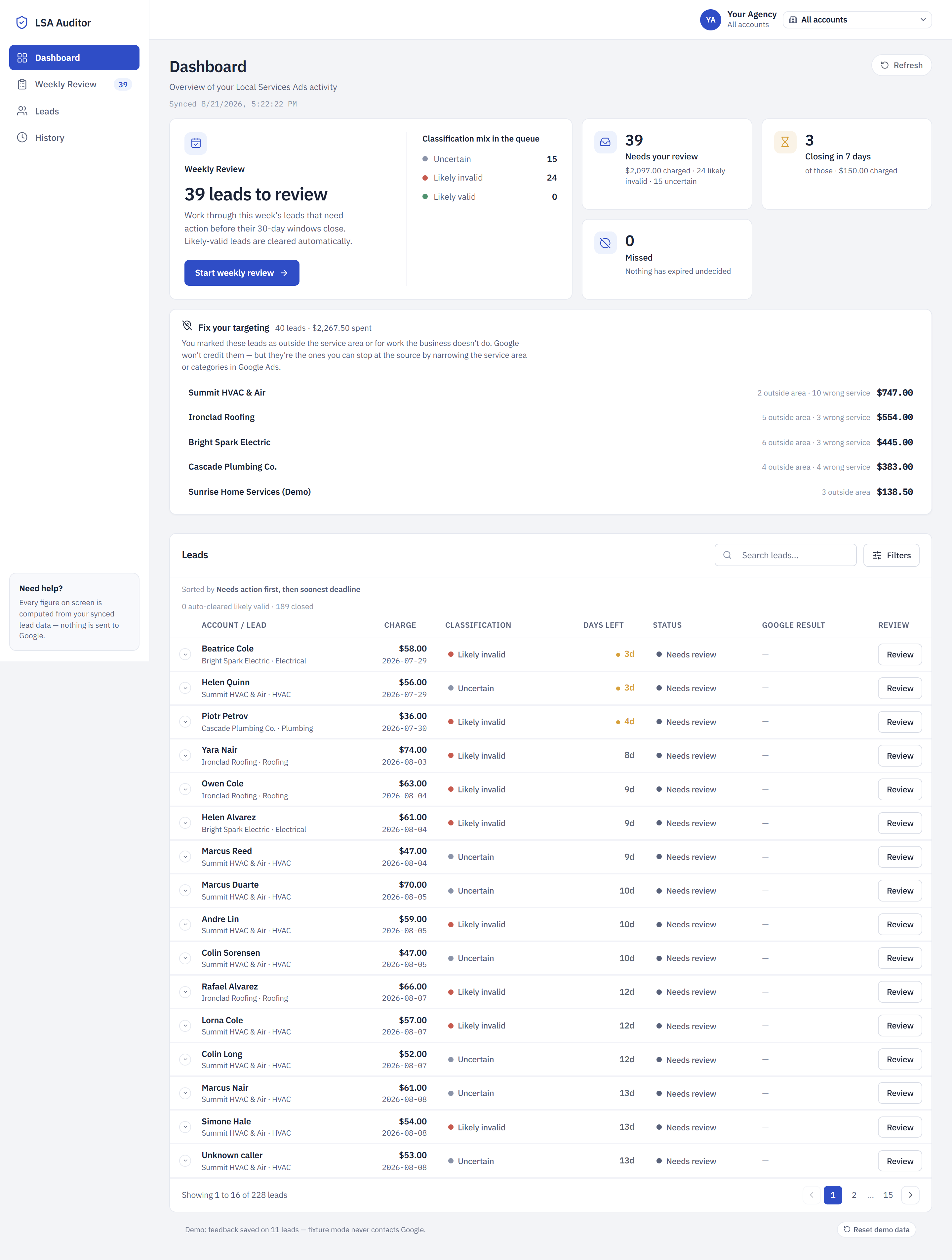
Nobody reviews 300 leads a week.
Google rates Local Services leads on its own now and issues credits automatically. Advertisers get a 30-day window to say something back, through a feedback survey. That's the whole mechanism — the manual dispute process people still talk about is gone.
Which leaves an agency with a boring, expensive problem: five accounts, a few hundred leads a month, a 30-day clock on each one, and no realistic way to look at all of them. So nobody looks. The bad leads expire quietly and the client gets billed for them.
The fix isn't a prettier report. It's a shorter list. Everything the classifier reads as a real customer is cleared out of the way before you sit down — and stays on the Leads screen with its reasoning attached, in case you disagree. What's left is 39 leads, most of them flagged as junk, and a deadline on each.
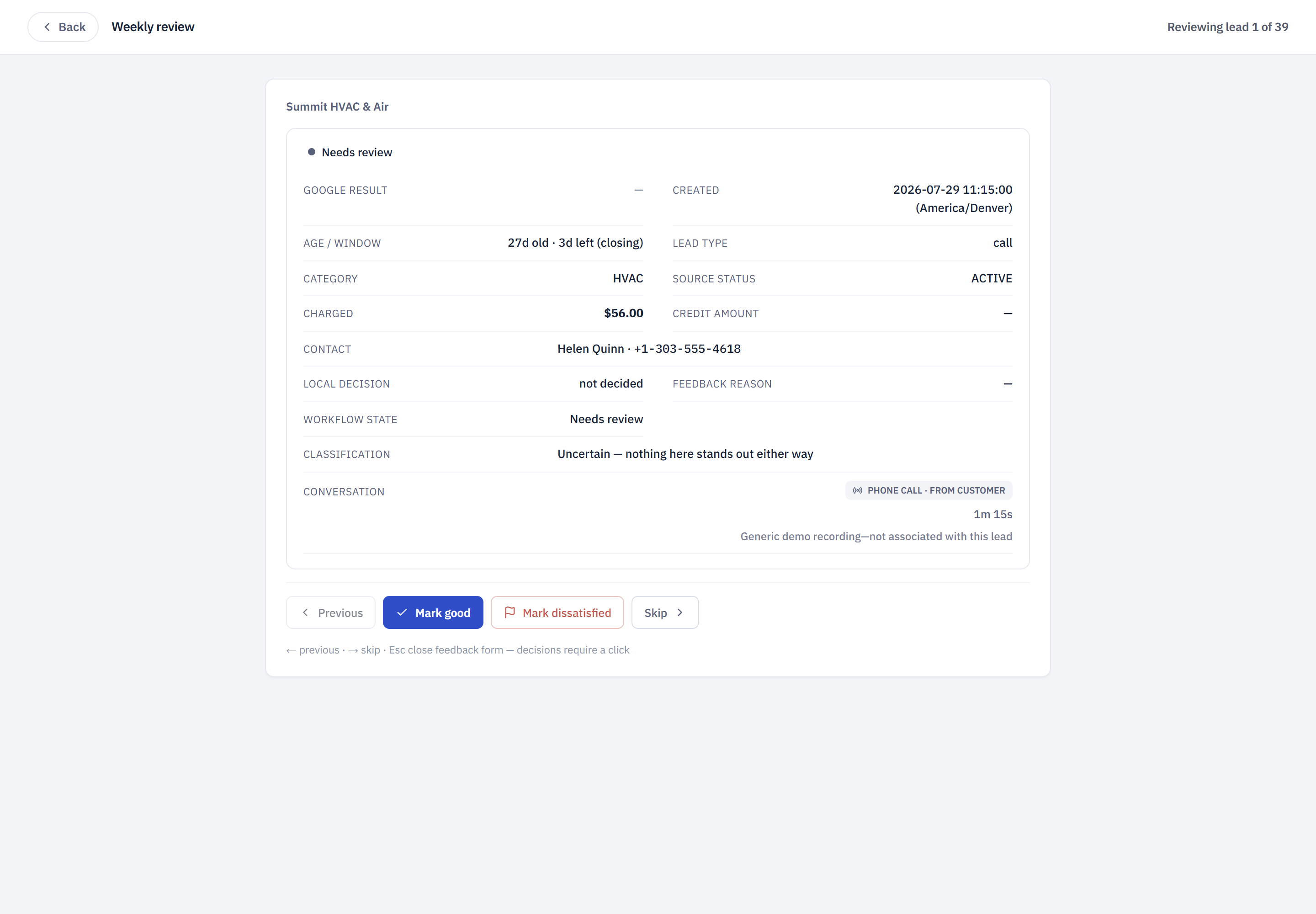
The review is a stack of decisions, not a dashboard.
Everything needed to judge one lead is on one card: what Google charged, how long is left on the window, what the caller actually did, and what the classifier thinks — labelled as a recommendation, because that's what it is.
- Mark good
Internal. It records your verdict and drops the lead out of the queue. It never sends anything to Google — deliberately, since a satisfied rating buys the client nothing.
- Mark dissatisfied
Opens the reason list, then a confirmation naming the account, the lead, the reason and any comment before a single byte leaves.
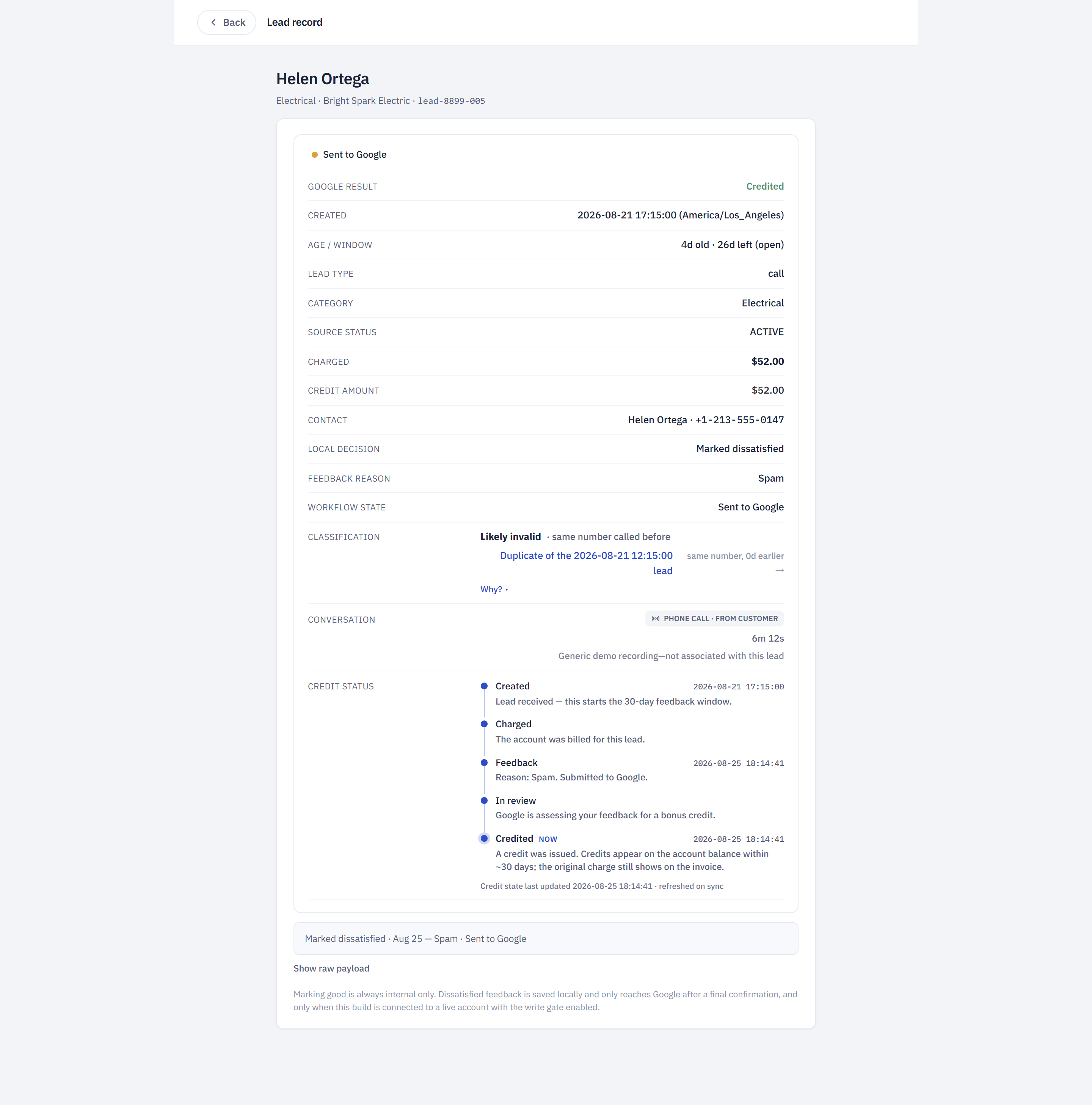
"Duplicate" means nothing unless you can go look.
Every recommendation carries the facts that produced it — the matched phone number, the earlier lead it matched, the gap in days, the window, and the version of the rules that made the call. The earlier lead is a link. Go check it.
Duplicate matching runs per account, never pooled. Two different businesses hearing from the same homeowner is not a duplicate, and one client's spam blocklist never clears another client's leads.
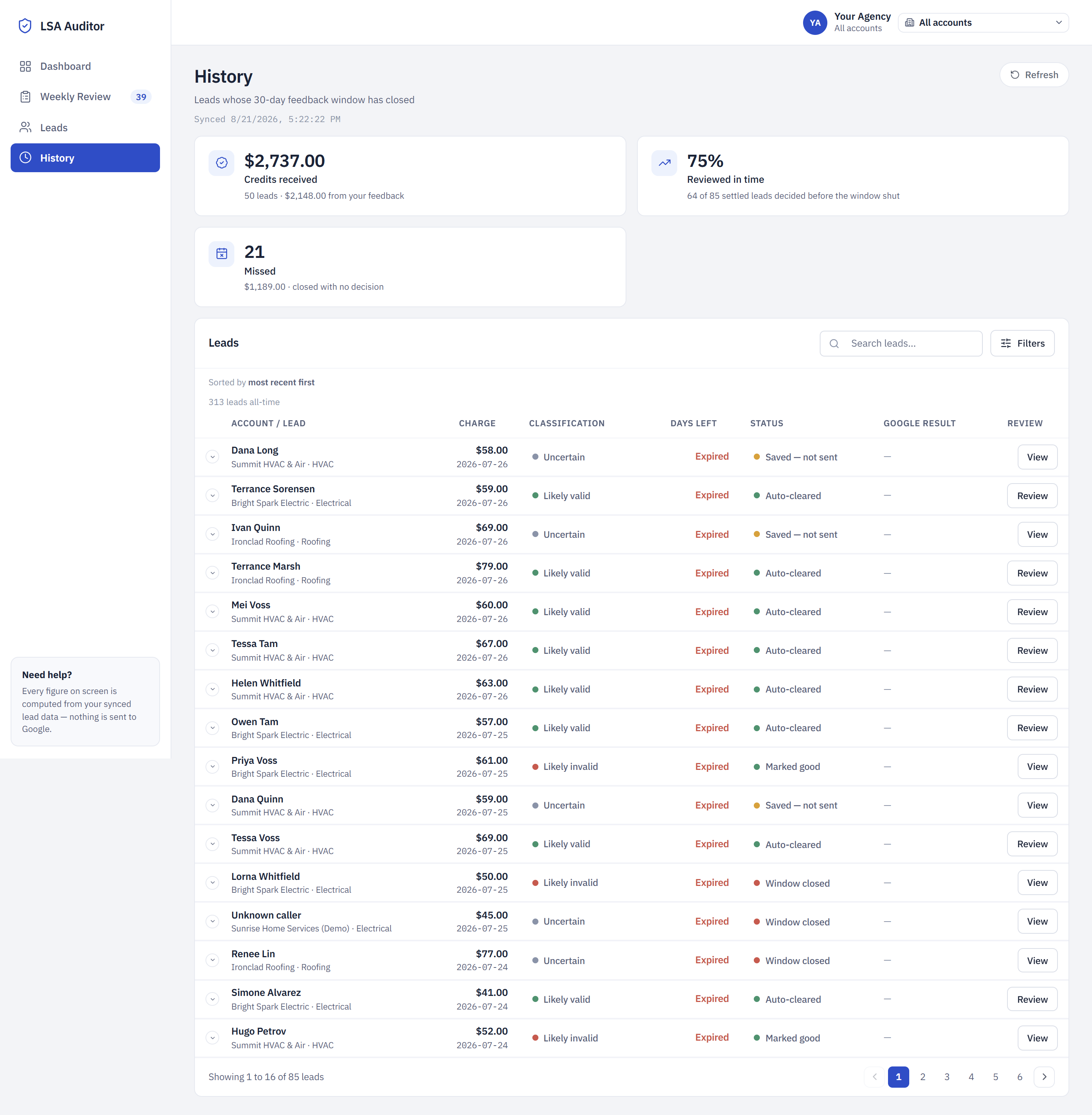
Numbers that survive being clicked on.
A headline figure that disagrees with the list behind it is the worst bug a reporting tool can have. Every figure here and its drill-down list are produced by the same predicate, so they can't drift apart.
The 39 leads in this week's queue — 24 the classifier reads as junk, 15 it isn't sure about.
21 leads whose window shut with nobody deciding. The number that argues for doing the review at all.
90 credited leads, of which $4,415.50 came from feedback this tool submitted. The rest were Google's own automatic credits.
The feedback that doesn't pay is the feedback that matters most.
A duplicate or a spam call gets you a credit — one lead's worth of money, once. But a lead that came from outside the service area, or asked for work the business doesn't do, is telling you something far more expensive: the targeting is wrong, and it will keep billing you every week until someone changes it.
Google won't credit those. It will listen to them.
That's why both reasons stay in the list, labelled honestly rather than hidden. An earlier version of this tool greyed them out because they don't earn money — which quietly threw away the only feedback that fixes the source of the problem. Every one you send tells Google its match was wrong, and points you at the service-area or category setting that let it through.
Credits claw back what you already spent. This stops you spending it.
The reasons it will send
- Spam
- Solicitation
- Duplicate lead
- Not ready to book
- Outside service area fixes targeting
- Service not offered fixes targeting
- Other comment required
Notes that stay yours
Every lead takes a private note. It is stored in its own field, it is never part of what gets submitted, and Google never sees it. It's there so the next person to open that lead knows what you already worked out.
"Third call from this area code this month — service area looks too wide."
Stays hereThat matters when the same number turns up twice, when a client insists a lead was fine, or when you're building the case that a campaign's radius needs cutting. The pattern is in the notes long before it's in a report.
- Private note
Yours. Never transmitted, never part of a submission.
- Comment to Google
A separate field, shown to you on the confirmation screen before it goes.
- Why separate
So you can write what you actually think without weighing whether an advertising platform should read it.
So the non-creditable leads get their own panel.
Every lead marked outside-area or wrong-service is totalled per client and put where you'll see it: $2,267.50 across 40 leads, with the worst account at the top.
It sits apart from the money figures on purpose. Those are about what might come back. This is about what keeps going out — and unlike a credit, it's fixed by changing one setting in Google Ads, once.
Ten wrong-service leads at Summit HVAC isn't ten small refunds you missed. It's a category that has been mismatched for a month.
Three locks in front of the one thing it can send.
Lead feedback is the only write in the whole product. Everything else is a read.
- Lock 1
Source must be live. On demo data the network is never touched at all.
- Lock 2
Write gate off by default. An explicit environment flag, not a setting anyone can nudge.
- Lock 3
A person confirmed it. Enforced on the server, so nothing can skip the confirmation screen.
- If shut
The feedback saves as “Saved — not sent” with the reason named. It never sits in a status that merely looks pending.
- If sent
Attempt, response, credit decision and errors are all written down. Retrying the same feedback can't submit it twice.
Where it actually is right now.
- Working
The classifier, the auto-clear, the weekly review, the audit trail, the money figures, the multi-account queue, and the Google feedback path with its locks in place.
- Demo data
Every screenshot on this page is the real interface running on a generated dataset — five example accounts, no client's leads.
- Not built yet
Accounts and sign-in. Which is exactly why this is a walkthrough and not a signup button.
- Next
One agency, one live account, reading only — then the write gate, once the numbers have been checked against a real Google Ads account by someone who'd notice if they were wrong.
If you run LSA for more than two clients, I'd like an hour of your scepticism.
I'll walk you through the review on the demo data, and you tell me where it's wrong, where it's tedious, and what your team would actually refuse to do every week. That's the whole ask — no contract, no signup.
Email [email protected]